Confluence alternative
The European alternative to Confluence.
SWCOLLAB is a team wiki with the work attached: pages, databases, files and requirements in one workspace. It runs on servers in Germany, so your data stays in Europe.
Bring your Confluence spaces with you. SWCOLLAB imports them with their page tree, comments and attachments.
No card. No automatic upgrade.
Your data stays in Europe.
The hosted SWCOLLAB runs on servers in Falkenstein, Germany, on an encrypted volume. Backups are encrypted and kept in Helsinki, Finland.
- Servers in Germany, backups in Finland
- Encrypted storage and encrypted backups
- No analytics, advertising or tracking tools
- Managed for you — no servers to run
Import your Confluence spaces.
Moving should not mean starting again. SWCOLLAB reads what Confluence gives you:
- the XML export of a space or a whole site
- the CSV export, which Atlassian names as the successor to XML
- the HTML export
- a Confluence Cloud site, read directly
Pages keep their place in the tree, their comments and their attachments. Common macros — info panels, expand, code, table of contents, status and page tree — become native SWCOLLAB blocks. Links between imported pages keep working, across spaces too. Markdown files and Word documents import the same way.
Everything your team uses Confluence for.
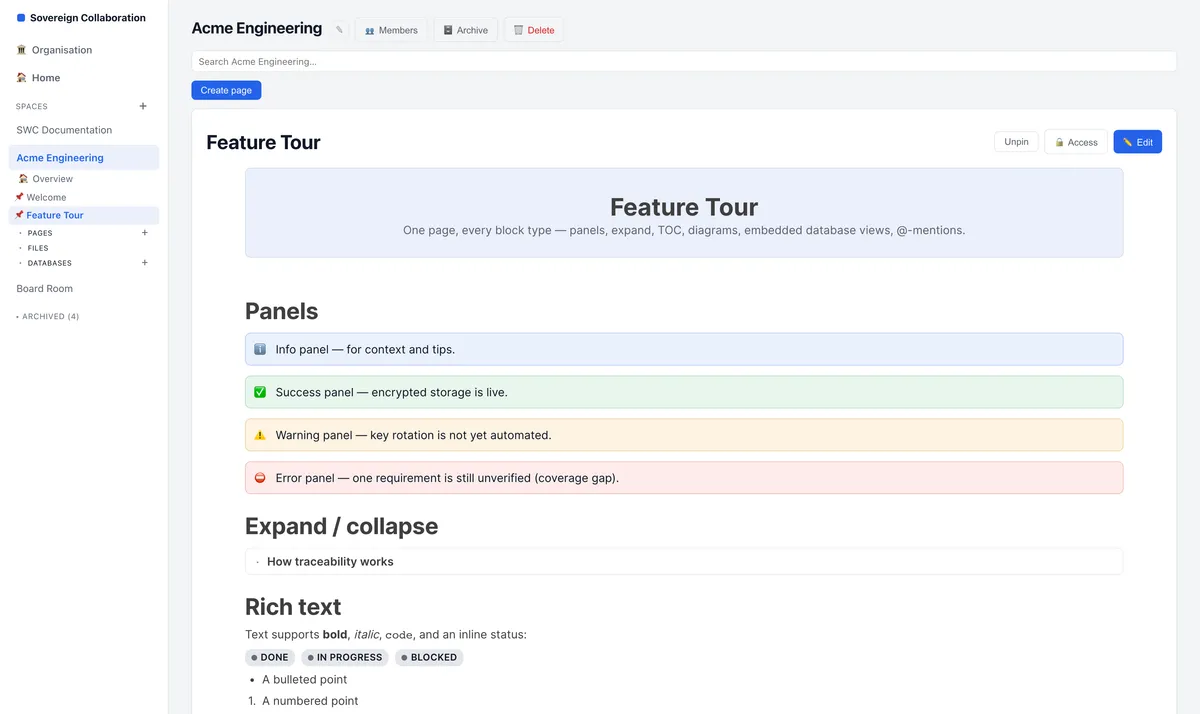
SWCOLLAB pages have what a Confluence team expects:
- rich text, panels, collapsible sections and diagrams
- comments on selected text, reactions and @-mentions
- page and space templates
- page approvals and complete version history
- blogs for team news
- PDF and Word export
And the work lives next to the page.
With Confluence, the work is in another tool. In SWCOLLAB, databases hold your tasks, requirements, risks and tests, with nine views from table and board to Gantt and pivot. Pages embed live views of those records, so a project page shows the real state of the work.
How the move works
Export from Confluence
Make an XML or CSV export of a space or of your site. Or skip the file and connect to your Confluence Cloud site.
Upload it to SWCOLLAB
Put the export in a library of the space that should receive the pages.
Choose and import
SWCOLLAB shows what the export holds — spaces, pages and files — and imports the spaces you choose.
Read the report
The report lists what came across and anything that did not. Undo the import if you want to start again.
Questions
Where is my data stored?
On servers in Germany, with encrypted backups in Finland. It stays in Europe.
Does the page tree survive the import?
Yes. Pages keep their parents, and links between imported pages point to the new pages.
What happens to attachments and comments?
They come across with their pages. Images and files stay linked from the page they belong to.
Can I try it before I move everything?
Yes. Sign up for free and import one space. The Free plan holds 50 pages; for a larger space, take Plus or Business, free for three months during the beta.
Compare SWCOLLAB
Move your wiki, and keep your data in Europe.
Start free, import a space, and see your own pages in SWCOLLAB.
No card. No automatic upgrade.