Jira alternative
The European alternative to Jira.
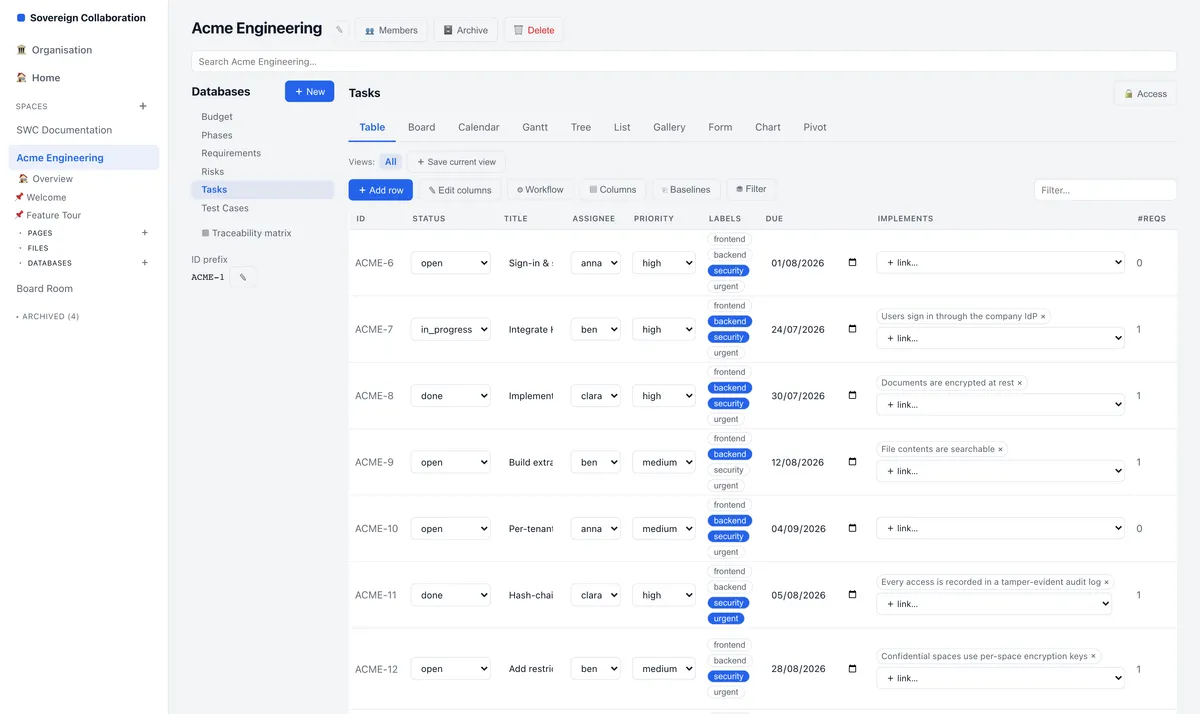
SWCOLLAB tracks work in databases that sit next to your documentation: tasks, requirements, risks and tests, on a board, in a table or on a Gantt chart. It runs on servers in Germany, so your data stays in Europe.
Moving from Jira? Import your issues with their hierarchy, links, comments and attachments.
No card. No automatic upgrade.
Import your Jira issues.
SWCOLLAB reads a Jira CSV export, or reads your issues straight from your Jira site — a whole project, or the result of a JQL search. Each issue becomes a row in a database:
- fields and statuses map to columns you choose
- assignee and reporter are matched to the people in your space
- parents and sub-tasks keep their tree
- issue links become links between rows
- the description becomes the row’s page, with its comments
- attachments go into a library
Nine views of the same work.
Table, Board, Calendar, Gantt, Tree, List, Gallery, Chart and Pivot — every view works from the same rows. Move a task on the board and the Gantt chart updates. Change a date in the table and the calendar updates.
Work and documentation, connected.
With Jira, the specification is in another tool. In SWCOLLAB, every row opens as a full page, and pages embed live views of your tasks. Requirements show which tasks implement them and which tests verify them — so traceability comes from the work itself.
Your data stays in Europe.
The hosted SWCOLLAB runs on servers in Falkenstein, Germany, with encrypted backups in Helsinki, Finland.
How the move works
Export from Jira
Export your issues as CSV. Or skip the file and read them from your Jira site.
Map the fields
Choose which Jira fields become which columns, and how statuses and people match.
Import
SWCOLLAB creates the rows, then sets parents, links, pages and comments.
Read the report
The report lists every issue that came across, and any that did not.
Questions
What comes across from Jira?
Issues with their fields and status, assignee and reporter, parents, links, descriptions, comments and attachments.
Do I need an export file?
No. Upload a CSV export, or read the issues straight from your Jira site with a project key or a JQL query.
Can I keep working on a board?
Yes. The Board view groups rows by a column such as status, and a card moves when you drag it.
Where is my data stored?
On servers in Germany, with encrypted backups in Finland. It stays in Europe.
Bring your issues. Keep your data in Europe.
Start free, import a project, and work on it next to your documentation.
No card. No automatic upgrade.